 Label Ledger
Find the carrier adjustments you can dispute, and stop the next ones.
Label Ledger matches every label adjustment to its Shopify order, tells you why the carrier charged it, shows which ones the carrier's own numbers contradict, and builds the dispute packet before the deadline.
Free plan · paid plans from $19 per 30 days with a 14-day trial · reads orders only, never changes them
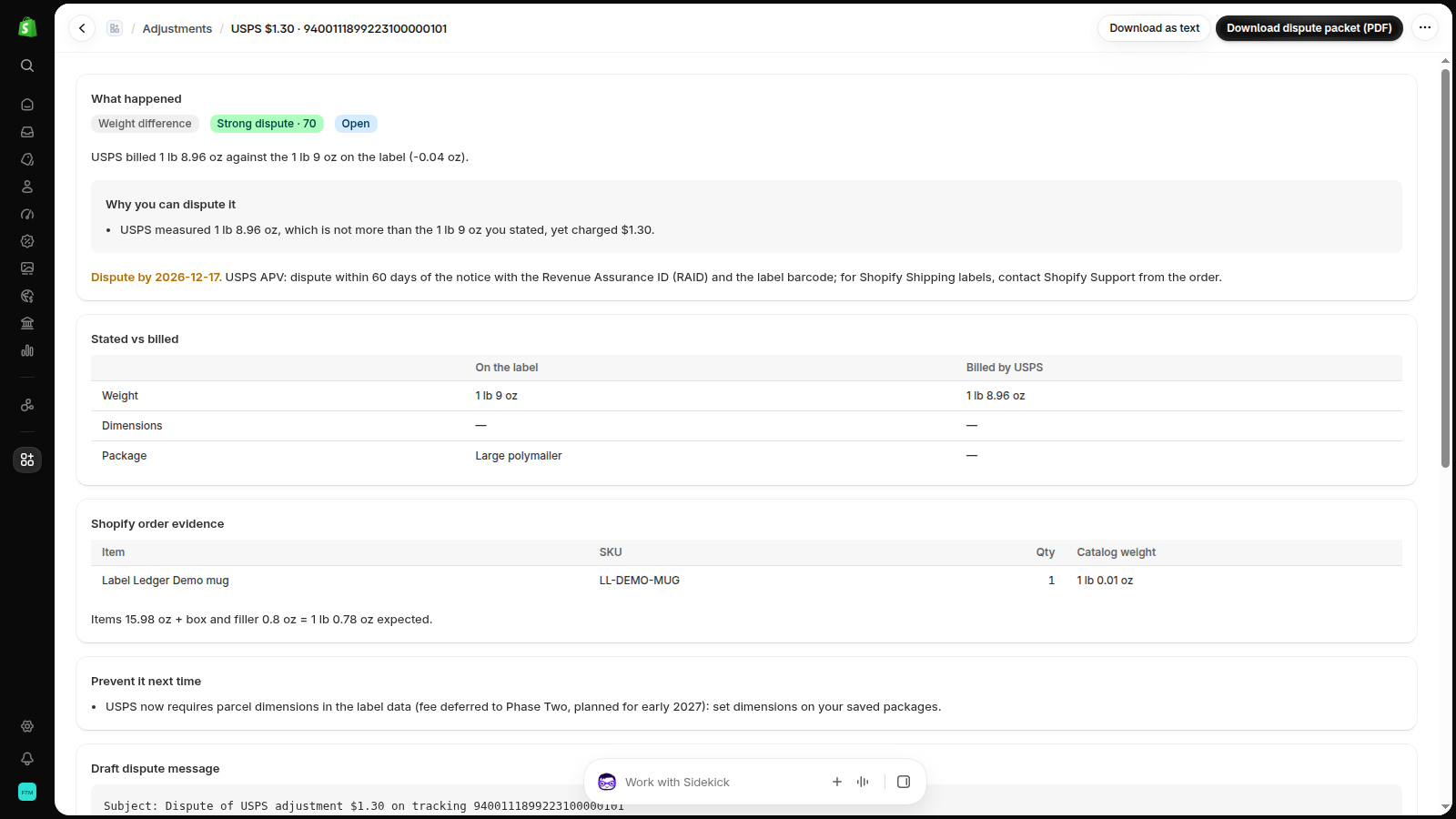
Weight: stated 25 oz, measured 24.96 oz$1.30Strong dispute
Residential surcharge, business address$6.45Possible dispute
Billed 40 lb for a 6 lb box$31.75Strong dispute
Adjustments arrive weeks later, one line at a time
Reweighs, dimensional weight, residential surcharges and address corrections show up long after the parcel is delivered: in an order timeline, on the Shopify bill, or deep in a carrier invoice. Most stores never add them up, so they accept them as "the cost of doing business". Merchants say it in their own words:
“Nearly every single one of my shipments gets a price adjustment that is basically a second initial charge.”
Public post, r/shopify, Oct 2026
“Last year we paid an additional $4,000 in APV. … Box sizes are entered correctly.”
Public post, r/shopify, Oct 2026
“I was charged $1.30 more for the package, but the weight was exact and correct.”
Public post, Shopify Community, May 2026
These are public posts by merchants, not Label Ledger customers.
What changes with Label Ledger
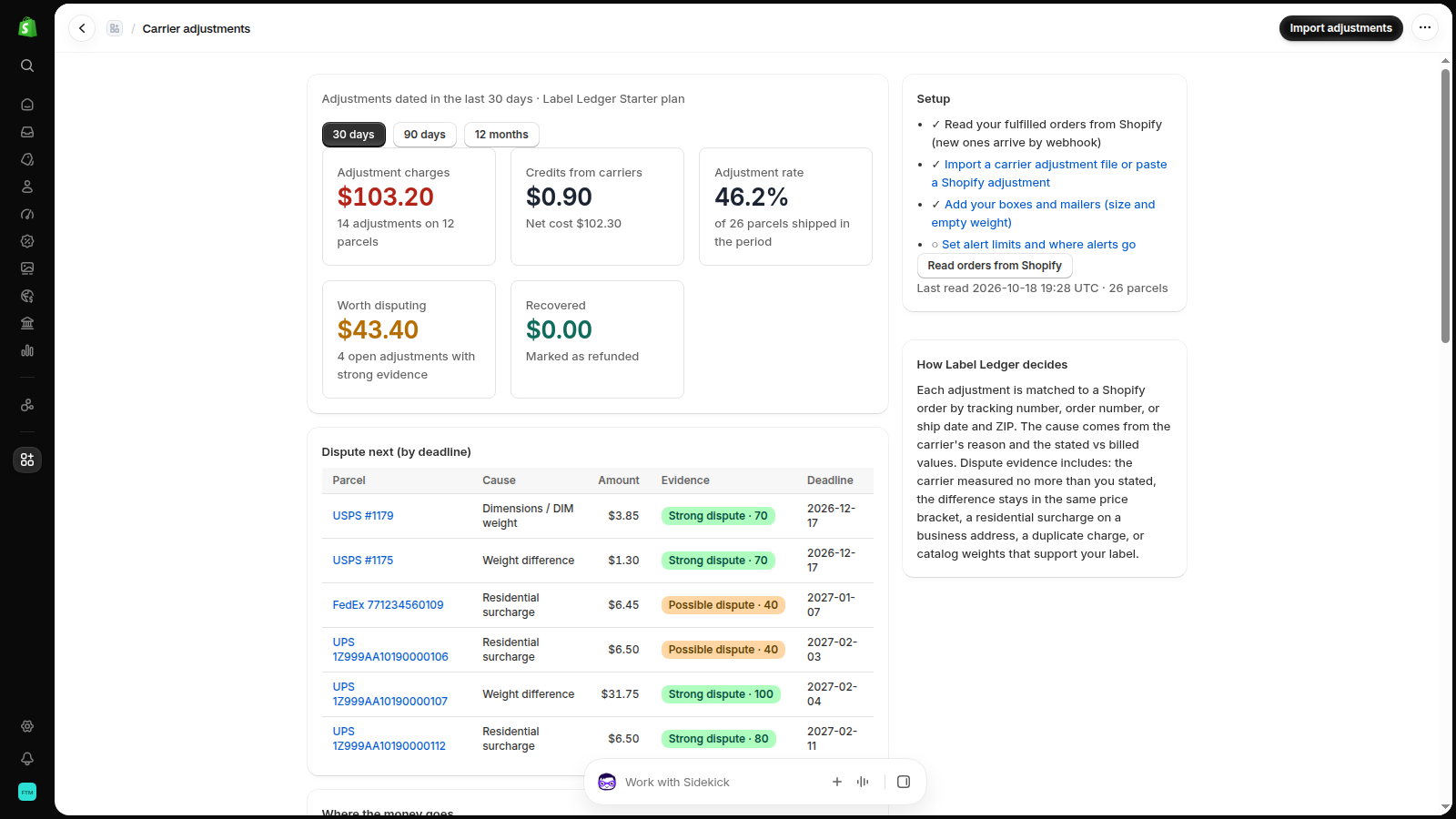
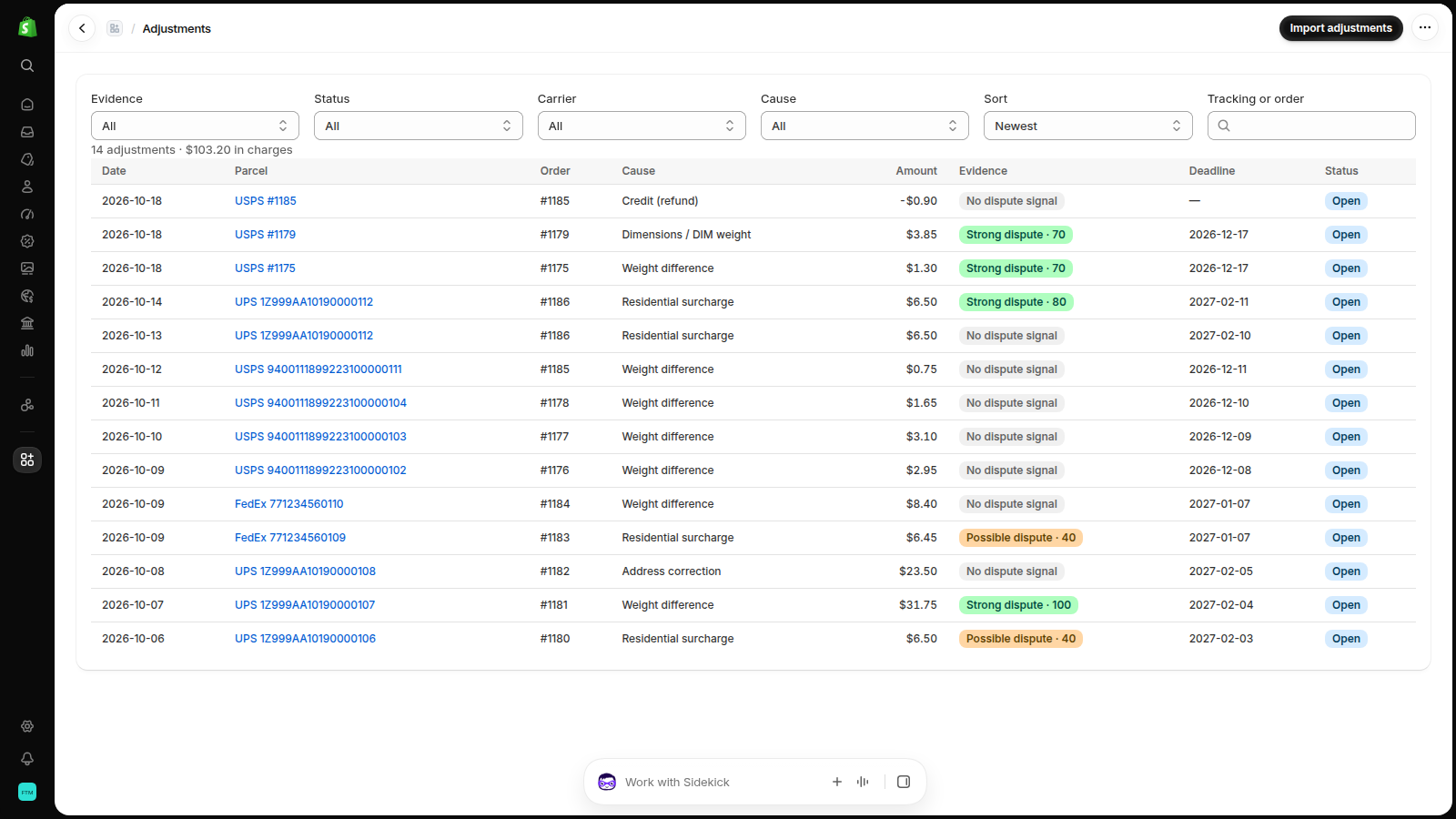
One ledger of every adjustment from every label source, tied to the Shopify order it belongs to.
Know why each one happened
Weight, dimensions, package type, residential, delivery area, address correction or no reason at all. With the stated and billed weight and size side by side, and the DIM weight the carrier used.
Dispute the ones the numbers contradict
Label Ledger flags a measurement no heavier than your label, a difference inside the same price bracket, an implausible reweigh, a residential surcharge on a business address, a duplicate charge, and labels your catalog weights support. Each with its deadline and a ready packet.
Fix the cause, not just the charge
See which SKUs, boxes, carriers and destinations create the cost. Get the catalog weight a SKU really ships at, the box size carriers really measure, and the packing allowance to add.
How it works
Import the adjustments
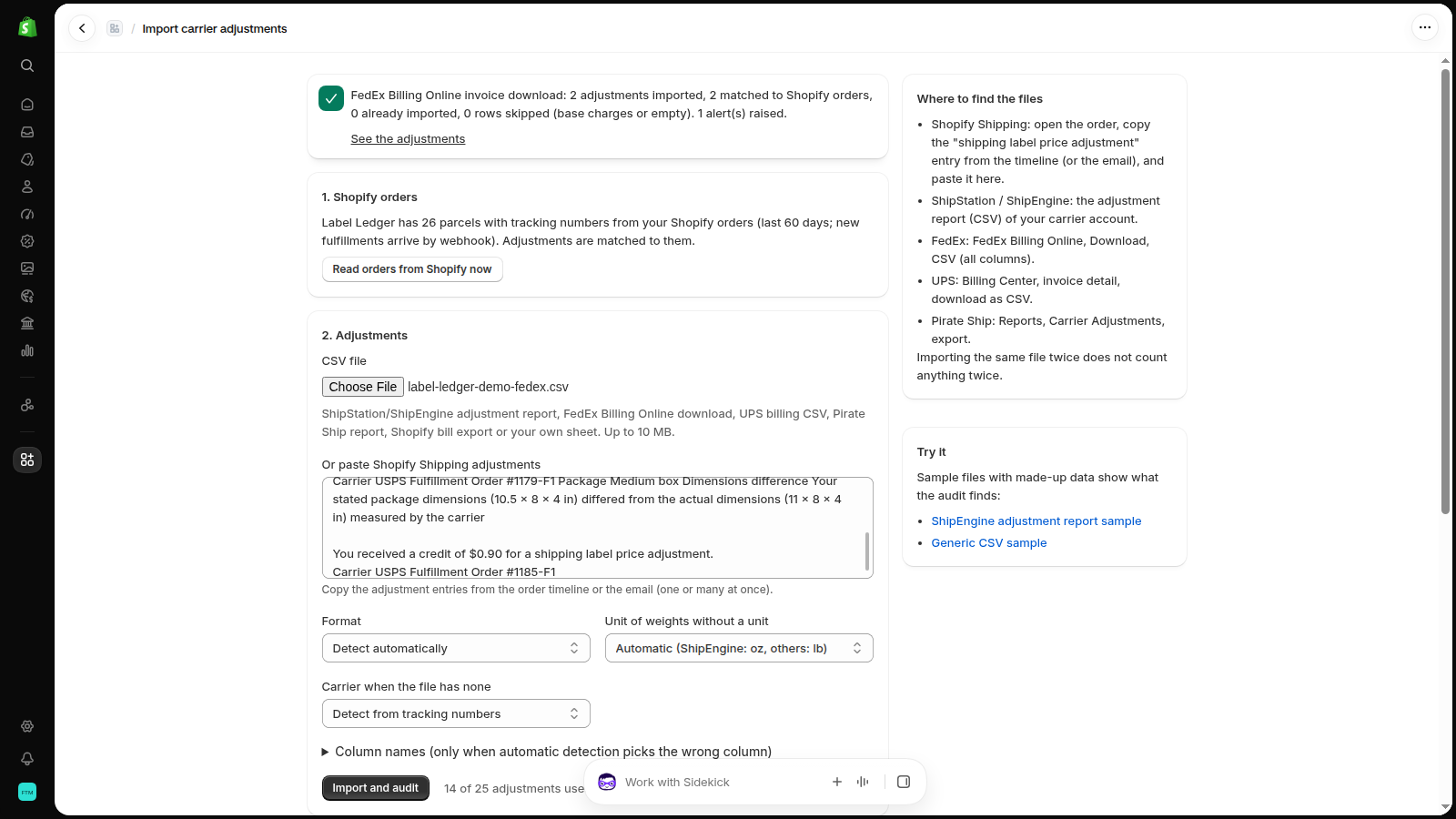
Paste Shopify Shipping adjustments from the order timeline, or upload a ShipStation / ShipEngine adjustment report, a FedEx Billing Online download, a UPS billing CSV, a Pirate Ship report or your own sheet. Importing the same file twice never counts twice.
Label Ledger matches and audits
Each adjustment is matched to its Shopify order by tracking number, order number, or ship date and ZIP, then compared with the items' catalog weights and your box sizes.
Dispute, then prevent
Download the dispute packet (PDF or text) with a draft message, send it to the carrier or Shopify Support, and track the result. Alerts tell you when the adjustment rate or cost crosses your limit.
Inside your Shopify admin
Screenshots of Label Ledger running on a Shopify development store with test orders.
What you can check before you trust it
No invented savings: Label Ledger shows its reasoning on every adjustment, and the carrier decides every dispute.
- Reads Shopify orders through the official Admin API with read-only access (orders and product weights).
- Keeps only what an audit needs: order number, tracking number, items and weights, and the destination country, state and ZIP.
- No customer names, emails, phone numbers or street addresses are stored.
- Uses the documented column names of ShipEngine adjustment reports and FedEx invoice downloads, and the wording of Shopify's own adjustment entries.
- Carrier rules built in: each side rounded up to the next inch, DIM divisors 139 (UPS, FedEx) and 166 (USPS), USPS ounce brackets.
- Default dispute windows you can change: USPS APV 60 days, FedEx 90, UPS 120 (label platforms differ).
- No code on your storefront, so no effect on your store's speed.
- Billed by Shopify. Cancel by switching to the free plan or uninstalling.
Pricing
One recovered reweigh often pays for a month. Plans renew every 30 days through your Shopify bill.
Free
- 25 adjustments audited per 30 days
- Causes, dispute strength and deadlines
- All dashboards
- 3 dispute packets per 30 days
Starter
- 500 adjustments per 30 days
- Unlimited dispute packets (PDF + text)
- Email alerts on your limits
- SKU weight, box and packing recommendations
- 14-day free trial
Pro
- Unlimited adjustments
- Everything in Starter
- Slack alerts
- Priority email support (1 business day)
- 14-day free trial
Questions
Does Label Ledger file the disputes for me?
No. Carriers and Shopify accept disputes only from the account holder. Label Ledger tells you which adjustments are worth disputing, by when, and gives you the packet and a draft message to send. You record the outcome so the dashboard shows what you recovered.
Does it see my Shopify Shipping adjustments automatically?
Shopify does not offer label adjustments through its API. You copy the adjustment entries from the order timeline (or the email) and paste them: many at once, a few seconds each. Carrier invoices and label platform reports are uploaded as CSV.
Which carriers and label tools work?
USPS, UPS, FedEx and DHL labels, from Shopify Shipping, ShipStation / ShipEngine, Pirate Ship, or your own carrier accounts. Any CSV with a tracking or order number and an amount works; you can name the columns if the automatic detection misses one.
Will I get my money back?
The carrier decides. Label Ledger never promises a refund; it shows the evidence in the carrier's own data and in your Shopify order, so you dispute the charges with a real case and accept the rest.
What data does it read, and what happens when I uninstall?
It reads fulfilled orders (tracking numbers, items, weights, destination country, state and ZIP) and the files you import. When you uninstall, Shopify asks the app to delete the store's data within 48 hours and it does. See the privacy policy.
How is this different from my shipping app?
Label apps help you buy labels. Label Ledger audits what happens after the label: it puts the adjustments from all of your label sources in one ledger, explains them, and turns the disputable ones into packets.
Stop paying adjustments you could have disputed
Start with your last 30 days of adjustments. The free plan is enough to see what you have been paying.
Request early accessQuestions? Support answers within one business day.